
AFileManager
A fast, lightweight Windows file manager designed for quick, everyday file organization.
Simplicity Meets Practical File Management
AFileManager is designed to help you organize files quickly and intuitively on Windows. Handle multiple folders with convenient tabs, managing both local drives and network shares (UNC paths) in a single unified UI.
In addition to fundamental operations like copy, move, delete, rename, and new folder creation, it supports efficient keyboard shortcuts and right-click context menus. It also provides practical customization features including language switching, default startup folder, and previous session tab restoration.
- PlatformWindows 10 Version 17763.0 or higher
- CategoryUtilities & Tools / File Manager
- PublisherMicrosoft Store (Almond-Dev)
- Key FeaturesTabs / UNC Network Shares / Session Restore
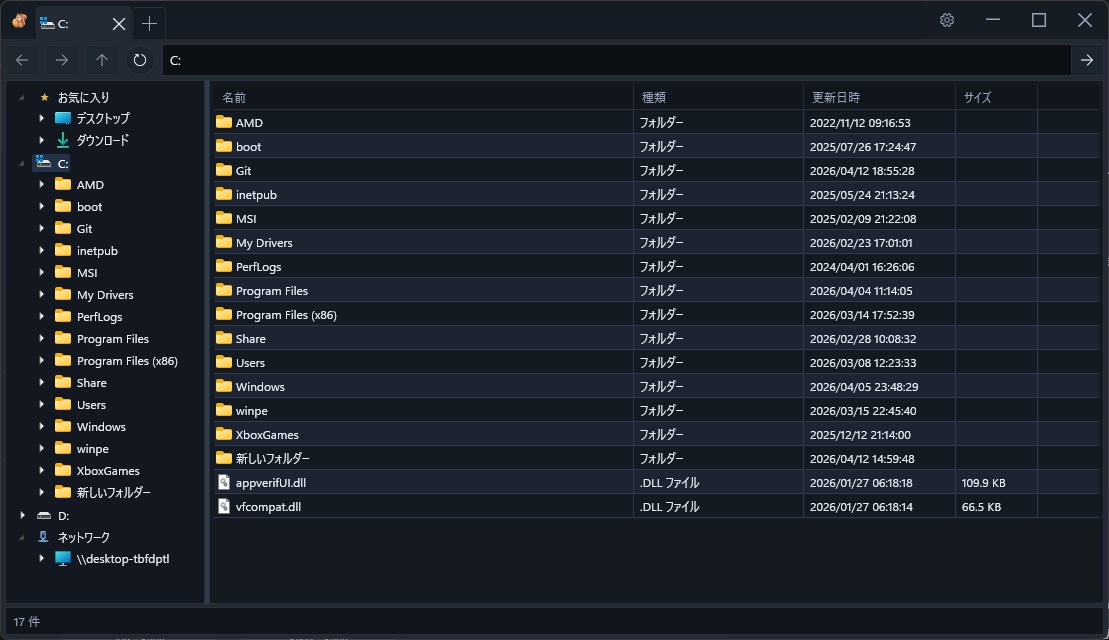
Features & Highlights
Multi-Folder Tab Browsing
Switch between multiple folders effortlessly with tabs, making file organization and moving items between locations significantly faster.
Local & UNC Network Shares
Access local disk volumes and network shared folders (UNC paths) with equal ease and seamless performance inside one application.
Practical Customization
Customize your startup folder, restore your previous tab session on launch, and switch interface languages with zero friction.
Fast Keyboard & Context Navigation
Quick keyboard navigation and contextual right-click menus ensure a responsive workflow tailored for power users and daily tasks.
Get Started Today
Install and receive automatic updates securely through the official Microsoft Store.
Get on Microsoft Store